
Setup WPA over SSH - Free WIFI
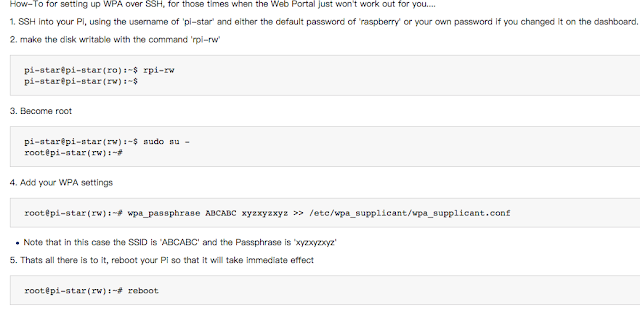
How-To for setting up WPA over SSH, for those times when the Web Portal just won't work out for you....

Setup #3 - The third step is to set up handsets, access to hot spots
The third step is to set up handsets, access to hot spots
C4FM mode: set the call sign, the handset frequency is 433.550MHz, DN data mode, press PTT to see if the hot plate dashboard has TX action
DMR mode: Refer to TeraTong MD-380 MMDVM write template of group file (for other handsets, you can also use 380 software to open the template), the number of contacts increases by 460, 46001, 46007 and other three call groups
MD380 / MD380G write frequency template and write the software as follows, two models common,
MD380G write frequency line production: http://www.aprspi.org/mmdvm/diy_hytmd380_linker
MD380G write frequency software (official): http: //39.106.17.242/download/TYT_MD-380G.rar
MD380G MMDVM write frequency template: http: //39.106.17.242/download/TYT_MD380G_BI7JTA_v1206_EN_CN.zip
P8668 MMDVM frequency templates and tutorials: http://39.106.17.242/download/p8668_ctb_template_bi7mtd.zip
Special Note:
1 Please be sure to call the inside and DMRid change their own, otherwise it will affect my login, no application to see http://www.aprspi.org/raspberry/pistar_dmrid_reg
2 Here only tell you a way to get started, advanced games such as brush machine please add group 320533571 look at the information, ask the group of friends
3 need to buy MD380 series hand shops please visit the store to consult
4 MD380G Fun APRS Positioning into Q group 683111553 See information
5 md380 / md380g Brush and adjust the power to 0.1 watts Tutorial See the last part of this book
D-star iCOM MMDVM set up tutorials, into the group consulting, P25 MOTO, MMDVM settings tutorial, into the group advice,
C4FM mode: set the call sign, the handset frequency is 433.550MHz, DN data mode, press PTT to see if the hot plate dashboard has TX action
DMR mode: Refer to TeraTong MD-380 MMDVM write template of group file (for other handsets, you can also use 380 software to open the template), the number of contacts increases by 460, 46001, 46007 and other three call groups
MD380 / MD380G write frequency template and write the software as follows, two models common,
MD380G write frequency line production: http://www.aprspi.org/mmdvm/diy_hytmd380_linker
MD380G write frequency software (official): http: //39.106.17.242/download/TYT_MD-380G.rar
MD380G MMDVM write frequency template: http: //39.106.17.242/download/TYT_MD380G_BI7JTA_v1206_EN_CN.zip
P8668 MMDVM frequency templates and tutorials: http://39.106.17.242/download/p8668_ctb_template_bi7mtd.zip
Special Note:
1 Please be sure to call the inside and DMRid change their own, otherwise it will affect my login, no application to see http://www.aprspi.org/raspberry/pistar_dmrid_reg
2 Here only tell you a way to get started, advanced games such as brush machine please add group 320533571 look at the information, ask the group of friends
3 need to buy MD380 series hand shops please visit the store to consult
4 MD380G Fun APRS Positioning into Q group 683111553 See information
5 md380 / md380g Brush and adjust the power to 0.1 watts Tutorial See the last part of this book
D-star iCOM MMDVM set up tutorials, into the group consulting, P25 MOTO, MMDVM settings tutorial, into the group advice,
MMDVM Nano Hotspot (video)
MMDVM Nano Hotspot (video)
my nano hotspot work very well, thanks Huang
my nano hotspot work very well, thanks Huang
my nano hotspot work very well, thanks Huang pic.twitter.com/UmvcWjnkeD— paulo pereira (@ct1hdc_paulo) December 9, 2017


MMDVM (Multi-Mode Digital Voice Modem) Getting Started
MMDVM (Multi-Mode Digital Voice Modem) Getting Started
This article will briefly introduce MMDVM (Multi-Mode Digital Voice Modem)
It is the UK open source project launched by HAM G4KLX, the statement for the GPL v2 protocol, to become an open source multi-mode digital voice modem, using the ARM processor and a simple analog interface board. Initially, it will support D-Star and DMR, system integration and P.25 will be introduced later, as well as a built-in FM repeater controller. For all modes except DMR and FM, the modem can be used in Simplex or Duplex mode and must be used for DMR and FM Full Duplex (part of the translation from Internet material).
This article will briefly introduce MMDVM (Multi-Mode Digital Voice Modem)
Welcome to reprint articles, but please keep this paragraph when reproduced and placed on top of the article: BI7JTA
This article was originally published at http://www.aprspi.org/mmdvm/mmdvm_userguide_view/
Foreword
Minato a lively, recently played a lot of HAM circle MMDVM digital radio gateway, preliminary statistics, as of 2017-10-13, China lovers access 525 (DMR id registration number). Many HAM first heard of MMDVM, do not know what to do with the original introduction of more information in English, the domestic ham is mostly written and description of the project configuration, partial technology, in order to let Xiao Bai quickly get started, the Bo to understand their own understanding Look, lead you into the pit, non-professional writers.1.MMDVM is what?
MMDVM (Multi-Mode Digital Voice Modem), Chinese translation: multi-mode digital voice modem. Simply put is digital voice cats, digital radio Internet gateway, to achieve a variety of digital formats, such as C4FM / DMR / D-STAR / P25 protocol global Internet.It is the UK open source project launched by HAM G4KLX, the statement for the GPL v2 protocol, to become an open source multi-mode digital voice modem, using the ARM processor and a simple analog interface board. Initially, it will support D-Star and DMR, system integration and P.25 will be introduced later, as well as a built-in FM repeater controller. For all modes except DMR and FM, the modem can be used in Simplex or Duplex mode and must be used for DMR and FM Full Duplex (part of the translation from Internet material).
MMDVM_Nano Product Details
I think you want to known the incude of my product。It contain nanoPi
NEO、mmdvm hs PCB、SD card 8g、Ceramic antenna、oled、USB Wi-Fi、power cable
1m、3d print shell with Slim fan and heat sink

HAM-Radio screens (NEXTION, OLED)
NEXTION@groups.io

HAM-Radio screens (NEXTION, OLED)
NEXTION@groups.io


GPIO definition
GPIO definition
NanoPi_NEO Official Wiki http://wiki.friendlyarm.com/wiki/index.php/NanoPi_NEO/zhDIY install a small fan can take 3.3V / GND from GPIO, enough to test 3.3V, the temperature can be reduced to 40 degrees, 5.0V noise slightly larger.
Use with NanoPi NEO Click to enlarge


Subscribe to:
Posts (Atom)